Home / Blog / ViciBox 12 on GCE
Journey log — ViciBox 12, GCEHow to install ViciBox 12 / VICIdial on Google Compute Engine (GCE)
Lab disk to cloud boot, app stack, carrier SIP, agent softphones, and a floor that places real outbound traffic — without pretending GCE boots the ViciBox ISO like a laptop hypervisor.
1. Is it possible on Google Cloud?
Yes. We run ViciBox 12 / VICIdial on Google Compute Engine in production today: web admin and agent UIs, Asterisk, MariaDB, agent softphones, and carrier SIP trunks handling live outbound and inbound contact-center traffic.
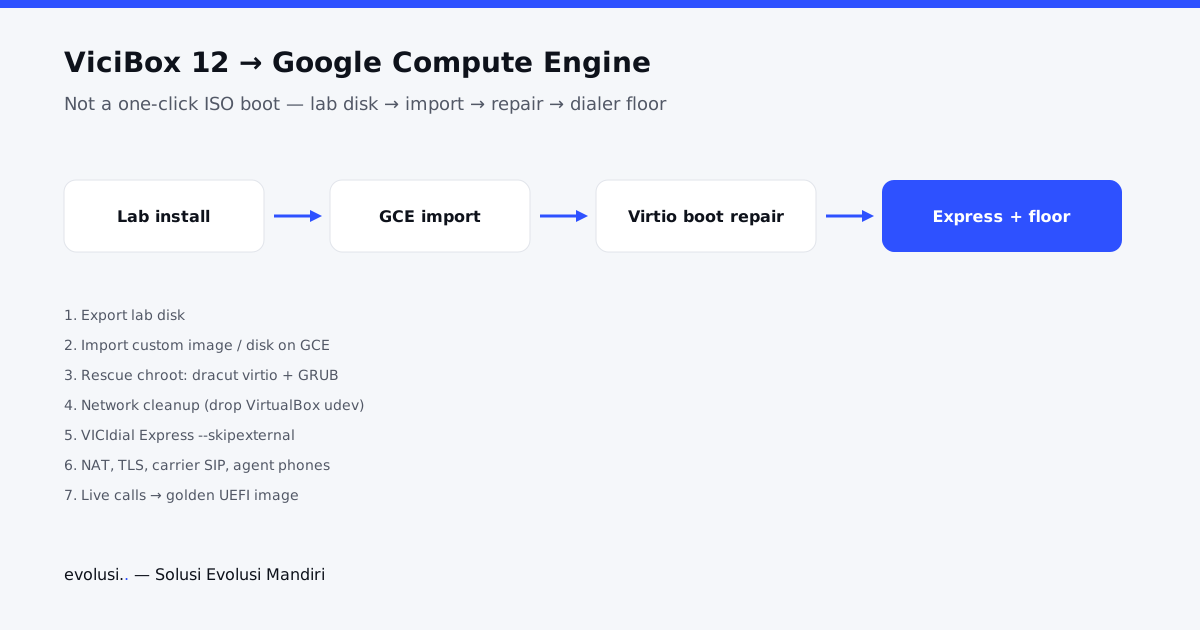
It is not a one-click marketplace appliance. ViciBox expects an openSUSE Leap 15.6 installer world. GCE will not boot that ISO the way VirtualBox or VMware does. The path that got us to production was:
lab install → export disk → import to GCE → offline virtio/boot repair → Express app install → NAT, TLS, carrier trunks → agent phones → campaigns and floor ops → freeze a reusable image.
Quick answer: download ViciBox, but do not treat the ISO as a GCE appliance
If your search is download ViciBox, start with the official VICIdial / ViciBox project. For Google Cloud, the download is only the installer source. The production path is still lab install, disk export/import, virtio boot repair, VICIdial Express, then SIP/RTP and agent-phone proof.
If your search is VICIdial 12 install guide, read “ViciBox 12” as the practical bundle: openSUSE, Asterisk, MariaDB, Apache/PHP, and VICIdial together. GCE does not remove the telephony work.
If someone tells you “just upload the ISO and next-next-finish on GCP,” they have not done this install. For how a production floor behaves after the stack is healthy, see our fintech VICIdial case study.
2. Challenges
Technical
- No clean ISO boot on GCE — you import a disk and own the boot chain.
- Initramfs / virtio — GRUB can look fine while
dracut-initqueuenever finds root. - Lab baggage — VirtualBox udev NIC rules and guest tools break DHCP/SSH or leave failed units in production images.
- openSUSE Leap 15.6 is a thinner fit for some GCE adapt paths than common cloud distros.
- OS up ≠ dialer up — Express (or equivalent) still has to land the VICIdial app tree and services.
- Installer edges — Express
--skipexternalhit undefineddebugoutputon our 12.x copy; Apache 500’d until/etc/astguiclient.confwas group-readable bywww. - Telephony on a public cloud — external IP/NAT in sip/pjsip/DB, firewall for SIP/RTP vs web/SSH, carrier CID rules, TLS for trunks that need it, agent phones on the right stack (chan_sip UDP vs PJSIP trunks).
- Day-2 production — certs, campaign dial prefixes, call-time/GMT, dead-agent cleanup, trunk failovers. Install is only the first half of “working production.”
Non-technical / operational
- Skills mix — GCE disks/images, Linux rescue/chroot, VICIdial admin, and SIP carrier ops.
- Time — intermediate images and dead-end boots are normal; production cutover needs a freeze point and rollback snapshots.
- Security discipline — temporary open HTTP for a browser test is fine; leaving 80/443 or SIP world-open is not.
- Stakeholder language — “on Google Cloud” must mean a clear go-live: trunks registered, agents registered, first real campaigns placing calls — not only a green SSH session.
- Ownership — who pays the always-on VM, who rotates admin and phone secrets, who owns carrier tickets when 484/486 show up.
Billing and cost shape
No invoice dump here — the shape that matters for a production ViciBox on GCE:
- Compute — always-on mid-size VM (example class: general-purpose 4 vCPU / 16 GB, e.g.
e2-standard-4). This is the steady meter; size for concurrent agents and trunks. - Disk + snapshots + images — boot disk plus pre/post-install snapshots and custom images while you iterate. Forgotten images keep billing after go-live.
- Networking — static external IP, egress, and any premium networking; a dedicated VPC is cheap insurance for firewall hygiene.
- Rescue VM — short-lived while repairing disks; stop it when idle.
- Carrier and numbers — SIP trunk and DID costs sit outside GCP and often dominate once the floor is busy.
- People time — until the image is golden, engineer hours usually beat the VM bill.
Habits that keep production sane: delete failed images, stop rescue hosts, relock admin paths, and size the VM for concurrent agents/trunks rather than “leave a huge box running empty.”
3. Preparations
Built for teams putting a real VICIdial floor on GCE — not a disposable lab forever.
- GCP project with Compute Engine, billing, and a region close to agents/carriers (example for Indonesia-facing ops:
asia-southeast2). - Custom images with
UEFI_COMPATIBLE, snapshots, static IPs, VPC firewall. See Google’s docs on importing disks and creating custom images. - A completed ViciBox 12 install in a lab hypervisor you can export as a boot disk (VICIdial / ViciBox project).
- A small rescue image (Debian works) in the same zone for offline chroot repair.
- SSH keying and a locked admin source for port 22.
- Carrier ready: SIP trunk credentials, expected dial patterns, Caller ID rules, and whether agents use UDP SIP softphones.
- FQDN and certificate plan for HTTPS and any SIP-TLS trunks.
- Written go-live criteria (next section) and a habit of snapshotting before Express and before trunk cutover.
4. Planning
Go-live criteria (production)
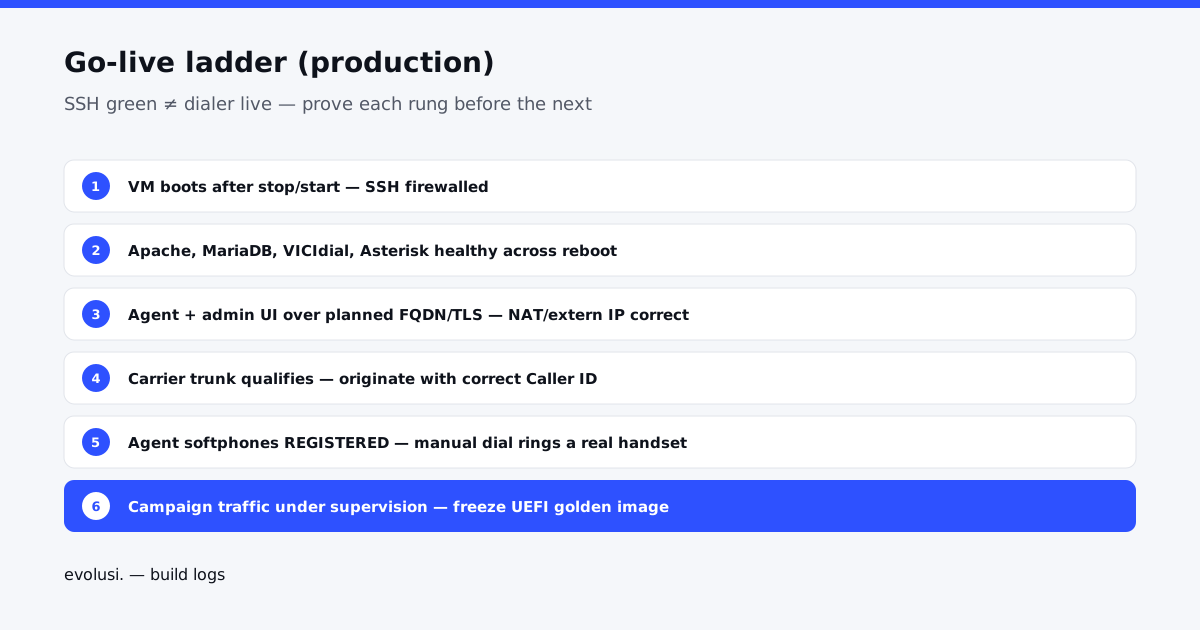
- VM boots after GCE stop/start; SSH under restricted firewall.
- Apache, MariaDB,
vicidial, Asterisk healthy across reboot. - Agent UI and admin UI reachable over the planned hostname/TLS path.
- External IP/NAT correct in sip/pjsip and DB server rows.
- Carrier trunk registers or qualifies; test originate with proper CID succeeds.
- Agent softphones register; manual dial places a real PSTN or agreed test call.
- Campaigns, lists, and dial prefixes match carrier patterns; call-time/GMT sane for the market.
- Post-install snapshots + a reusable custom image for rebuilds.
- Default installer admin rotated; SIP/RTP/AMI/DB not casually open to the world.
Phased plan
- Foundation — import, boot repair, network, Express, web conf.
- Platform harden — NAT, firewall, TLS/FQDN, image freeze.
- Carrier — trunk, dialplan patterns, CID, inbound DIDs if needed.
- Floor — phones, campaigns, lists, agent UX, day-2 watchdogs.
Target shape
- Machine: general-purpose 4 vCPU class (e.g.
e2-standard-4), ~50 GB balanced boot disk (scale as needed). - Dedicated VPC for dialer rules separate from other workloads.
- Static external IP for signaling and stable carrier peering.
- Agent phones on chan_sip UDP; trunks on the path your carrier requires (UDP SIP and/or PJSIP TLS).
5. Execution
Phase A — Disk onto GCE
Install ViciBox 12 in the lab, export the boot disk, import into GCE as a custom image/disk. Do not expect a cloud DVD wizard. Early imports taught us GRUB can look healthy while the guest never reaches a real root filesystem.
Phase B — Boot repair
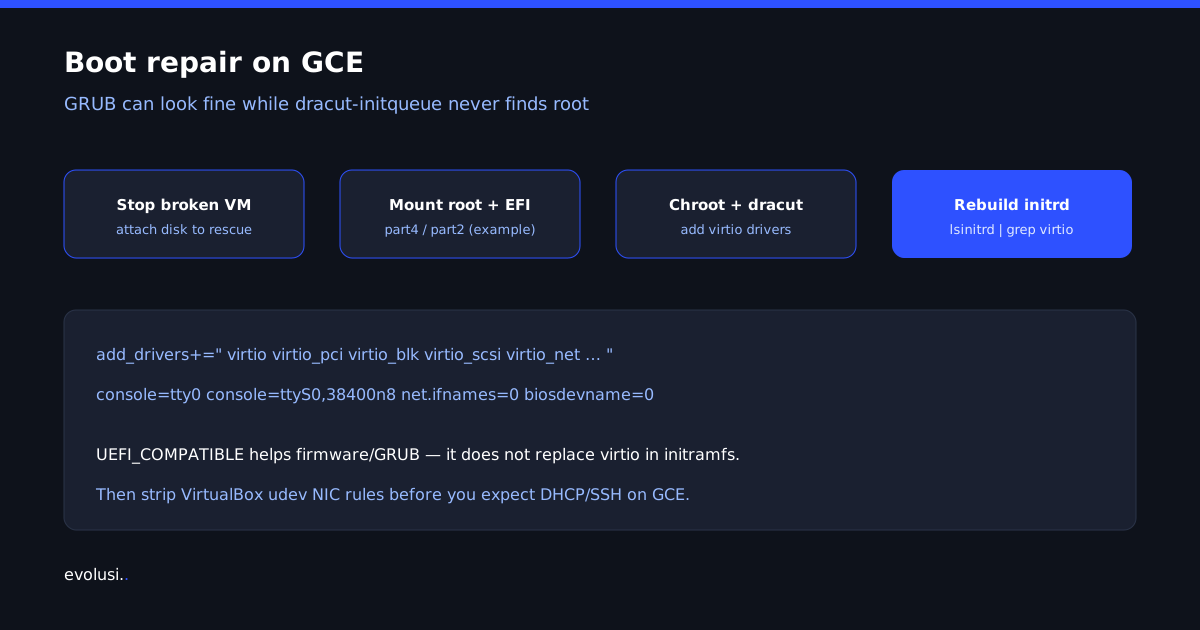
Stop the broken VM, attach the boot disk to a rescue VM in the same zone, mount root and EFI
(our working case: root part4, EFI part2), chroot, add virtio drivers to dracut,
rebuild initrds, regenerate GRUB. Confirm with lsinitrd … | grep virtio.
UEFI_COMPATIBLE helps firmware/GRUB; it does not replace virtio in the initramfs.
add_drivers+=" virtio virtio_pci virtio_pci_modern_dev virtio_pci_legacy_dev virtio_ring virtio_scsi virtio_blk virtio_net scsi_mod sd_mod "

console=tty0 console=ttyS0,38400n8 net.ifnames=0 biosdevname=0 plymouth.enable=0
Phase C — Network and first production-shaped VM
Serial login without SSH usually means VirtualBox NIC rules still own the story. Delete
/etc/udev/rules.d/70-persistent-net.rules, write DHCP ifcfg for eth0/eth1/ens4,
bake a UEFI custom image, launch the production host on a dedicated VPC with static external IP and tight tags.
rm -f /etc/udev/rules.d/70-persistent-net.rules

for iface in eth0 eth1 ens4; do
  printf 'STARTMODE=auto\nBOOTPROTO=dhcp\n' > /etc/sysconfig/network/ifcfg-$iface
done
Phase D — Express (VICIdial application)
SSH is not a dialer. Snapshot the disk, then run Express from a temporary copy of the installer
with --skipexternal so cloud NAT is under your control. On our 12.x tree the skipexternal path
called undefined debugoutput — a no-op on the copy fixed it. Never edit the packaged installer
in place.
sub debugoutput { return; }

# Copy the installer tree to a temp workdir first, then:
printf 'y\n' | perl /root/vicibox-install-tmp/vicibox-install.pl \
  --vicibox-express \
  --skipexternal \
  > /root/vicibox-install-tmp/express.stdout \
  2> /root/vicibox-install-tmp/express.stderr
If admin UI 500s: /etc/astguiclient.conf must be readable by Apache
(640 root:www on this stack). Agent UI 200 and admin login challenge mean the app is alive.
Rotate the default high-level admin before the host is treated as production.
chgrp www /etc/astguiclient.conf
chmod 640 /etc/astguiclient.conf
systemctl reload apache2 || systemctl restart apache2
Phase E — NAT, edge, and certificates
vicibox-externipwith the static external IP.sip.conf/pjsip.confexternal addresses and localnet for the VPC CIDR (Asterisk SIP/PJSIP concepts: Asterisk SIP docs).- DB server rows aligned to the same external identity.
- Firewall: SSH locked; web controlled; SIP/RTP only as the carrier design requires — never “open everything to debug.”
- FQDN + certificates for HTTPS and SIP-TLS trunks (on our production host, LE material is wired for the public name; Apache and Asterisk can need separate install paths).
Note: http://<ip>/ may 403 while /agc/vicidial.php and
/vicidial/admin.php are the real surfaces.
Phase F — Carrier SIP and production floor
This is the line between “stack installed” and “production dialer.”
- Define carriers in VICIdial with dialplan patterns that match how you build numbers (example: campaign prefix + national mobile form that hits
SIP/carrier-trunk— never invent a string the dialplan does not own). - Carrier Caller ID rules matter: bare originates without CID can fail (e.g. 484) even when the trunk is healthy.
- Agent phones: chan_sip UDP registration to the host; registration password is not always the same field as the agent UI login password.
- Campaigns and lists for the real floor, hopper or owner-dial rules, and local call-time/GMT aligned to your market (server GMT and lead offsets must match where agents and customers actually are).
- Inbound DIDs and any secondary trunks (including messaging/SIP side paths) only after the primary PSTN path is proven.
- Day-2: dead-call cleanup, list reset hygiene, monitoring — production is a living system, not a single green check.
Prove go-live with: trunk qualify/register, controlled originate with correct CID, agent softphone REGISTERED, manual dial that rings a real handset, then campaign traffic under supervision. Freeze a post-cutover snapshot and UEFI custom image once that holds across stop/start.
6. Results
| Platform | GCE, region near agents/carriers, 4 vCPU class, dedicated VPC |
|---|---|
| OS / app | openSUSE Leap 15.6, ViciBox 12, PHP 8.2, Apache |
| Telephony core | Asterisk 18 (vici build), MariaDB 10.11, asterisk DB populated |
| Web | Agent + admin UIs live; production FQDN/TLS in operation |
| Connectivity | Static external IP, NAT set, carrier SIP trunks in production use |
| Floor | Agent softphones, campaigns/lists, outbound (and inbound as configured) live traffic |
| Continuity | Stop/start persistence, snapshots, reusable UEFI custom image |
| Hygiene | Strip VirtualBox guest leftovers on golden images; rotate installer defaults |
Rebuild path: new instance from the golden image with UEFI guest OS features, same VPC and network tags, static IP as needed, restore carrier secrets from your vault (never from a blog), confirm trunk + one agent phone before opening the floor.
End-to-end ladder
- Lab ViciBox 12 → export → GCE import.
- Rescue: virtio dracut + GRUB serial/legacy NIC names → UEFI image.
- Fix udev/DHCP → SSH on dialer VPC.
- Snapshot → Express (temp installer,
--skipexternal) → conf permissions → rotate admin. - NAT, firewall, FQDN/TLS.
- Carrier trunks + dialplan/CID → agent phones → campaigns.
- Live call proof → stop/start → post-cutover image → day-2 ops.
Extractable answers (cost, ISO myth, boot, SIP, softphone)
Self-contained blocks for the questions this install log already implies. Details still live in the journey sections above; floor KPIs live in the production case study, and the VICIdial installation service explains the infrastructure, testing, and handover path for teams planning the same build.
How much does ViciBox on GCE cost?
Answer: Budget a steady Compute Engine VM, disk and snapshot storage, and usually a static external IP — not $0. Carrier SIP and people time dominate once agents are live.
- VM class — production shape we reuse: general-purpose 4 vCPU (e.g.
e2-standard-4) near agents/carriers. - Disk — ~50 GB balanced boot plus snapshot/image storage for rebuilds.
- IP — static external IP when carriers need stable signaling (billable when reserved).
- Outside GCP — SIP trunk minutes, DIDs, and operator time are not in the Google invoice.
Why not a marketplace appliance or “cloud ISO” install?
Answer: There is no trustworthy one-click DVD path for production ViciBox 12 on GCE. Marketplace shortcuts and “boot the ISO in the cloud” myths skip virtio, NAT, Express, and carrier work.
- Proven path: lab ViciBox 12 → disk export/import → boot repair → Express → NAT/TLS → trunks → phones.
- UEFI guest flags alone do not make a bare ISO image production-ready.
- See section 1 and Phase A–B for the import path we use.
Virtio / boot repair checklist (single block)
Answer: If the imported disk hangs after GRUB, fix virtio in a rescue chroot before blaming ViciBox itself.
- Attach the disk to a rescue VM in the same zone; mount and
chroot. - Ensure virtio block/SCSI (and related) drivers are in dracut; rebuild initramfs.
- Verify with
lsinitrdthat virtio modules are present. - Fix GRUB serial / legacy NIC naming baggage from the lab hypervisor when needed.
- Build a
UEFI_COMPATIBLEcustom image; boot a fresh instance; confirm SSH after stop/start. - Only then run Express and app configuration (snapshot first). Full narrative: Phase B.
SIP/RTP ports and NAT on public cloud
Answer: Treat the dialer as a public-cloud PBX: one consistent external IP/NAT story, tight firewall tags, and carrier-shaped SIP/RTP — never world-open “debug” ports.
- SSH locked to admin sources; web 80/443 controlled; SIP/RTP only as the trunk design requires.
- External IP and NAT must match sip/pjsip and VICIdial server IP fields or trunks fail mysteriously.
- Prefer a dedicated VPC and network tags for dialer traffic separate from other apps.
- FQDN + certificates for HTTPS and any SIP-TLS trunks. Details: Phase E–F.
Agent softphone path (high level)
Answer: Prove one agent phone end-to-end before campaigns. On our GCE production shape, agent softphones typically register UDP SIP (chan_sip) while trunks follow the carrier’s UDP SIP and/or PJSIP TLS path.
- Create/test phone → register softphone → manual dial with correct CID → hear far end.
- Do not open the floor until trunk qualify + one real call succeed across stop/start.
- Some floors use browser WebRTC phones instead — pick one path and document it; do not mix casually.
- Operational scale-up of agents and KPIs: case study.
Go-live gates and “Not proven” list
Answer: SSH and a green Apache page are not production. Treat anything below as not proven until checked.
- Not proven: import without stop/start persistence.
- Not proven: UI only on a temporary IP without the planned FQDN/TLS path.
- Not proven: trunk “registered” without a successful originate + correct CID.
- Not proven: agent account exists but softphone never places a real call.
- Not proven: campaign traffic before lists/prefixes match carrier dial patterns.
- Go-live: ladder in Planning — each rung holds before the next.
FAQ
Can you install VICIdial / ViciBox 12 on Google Compute Engine?
Yes — in production — via lab disk import and boot repair, not a cloud ISO wizard. See section 1 and ISO myth.
Why does an imported ViciBox disk hang at boot on GCE?
Usually missing virtio drivers in the initramfs. Rescue, chroot, dracut virtio, rebuild initrd, verify with lsinitrd. Checklist: virtio boot repair.
How much does it cost to run ViciBox on GCE?
VM + disk/snapshots + usually a static IP on GCP; carrier and people time outside Google. See cost shape.
What SIP/RTP ports should be open?
Only what the carrier design needs, on a dedicated VPC tag story — never world-open debug. See SIP/RTP and NAT.
What counts as production go-live?
Trunk + CID originate, agent phone registered, real test call, services across stop/start — not merely SSH. Gates: Not proven list.
Should Express use --skipexternal on GCE?
Yes when you manage NAT/external IP yourself. Snapshot first; patch only a temporary installer copy. See Phase D.
7. Summary
Possible on Google Cloud? Yes. We install and operate ViciBox 12 / VICIdial on GCE as a production contact-center stack — not only a cloud experiment.
Hard parts: appliance import and virtio boot repair, cleaning lab NIC baggage, finishing Express/app correctly, then the real work of NAT, certificates, carrier SIP, agent registration, and campaign math. Cost is a steady VM plus snapshot/image discipline; carrier and people time dominate once the floor is busy.
What we repeat: dedicated VPC, snapshot before Express and before trunk cutover, temp installer patches only, prove UI before trunks, prove trunks before the floor, freeze a UEFI image after stop/start holds.
What “done” means here: production dialer on GCE with carrier SIP and agents placing real calls — built from a scratch import path, not a fictional one-click ISO install.
Need the same journey on your Google Cloud project — foundation through carrier cutover? Talk to Solusi Evolusi Mandiri. Read the production case study. ← Build logs